


This one has bugged me more than once because every tool seems to have its own little regex dialect.
That was the voice of the original note, and it is worth preserving: regular
expressions are powerful, but they are not universal magic words. grep, awk,
sed, Perl, Python, and GNU find each bring slightly different expectations.
The useful trick is not memorizing every dialect. The useful trick is knowing
how to ask the tool which dialect it understands, then writing the pattern in a
way a tired operator can still read later.
Ask find which regex types it supports
The old article used a deliberately silly regex type as a discovery trick:
find ./ -regextype taco
find: Unknown regular expression type `taco'; valid types are `findutils-default',
`awk', `egrep', `emacs', `gnu-awk', `grep', `posix-awk', `posix-basic',
`posix-egrep',

`posix-extended'.
That tells you two useful things:
- this host is using GNU/findutils-style
find; - you can choose a regex language instead of guessing.
That portability caveat matters. BSD/macOS find is not GNU find, BusyBox
find is smaller, and old Unix systems may not support the same flags. In a
runbook, say what family of find you expect. On Linux, find --version will
usually tell you whether you are on GNU findutils.
The compact archive search
The original cleaner command was:
find ./ -regextype egrep -iregex '.*\.(gz|zip|tar|rar|7z)'
I tend to like the egrep style because alternation reads naturally:
- start below the current directory;
- use a familiar extended regex style;
- ignore case;
- match common archive extensions.
One subtle but important detail: GNU find -regex matches the entire path, not
just the basename.
That is why the pattern starts with:
.*
If the file is ./downloads/backup.tar.gz, a regex such as
(gz|zip|tar)$ is not enough because the whole string includes
./downloads/backup.tar.gz. You either match the full path or use a different
test such as -name.
The dot before the extension should also be escaped:
\.
Without the escape, . means “any character.” The older post used:
find ./ -regextype egrep -regex ".*.(gz|zip|tar|rar|7z)"
That often works in practice, but .*\.(...) says the intent more precisely.
Example directory and expected output
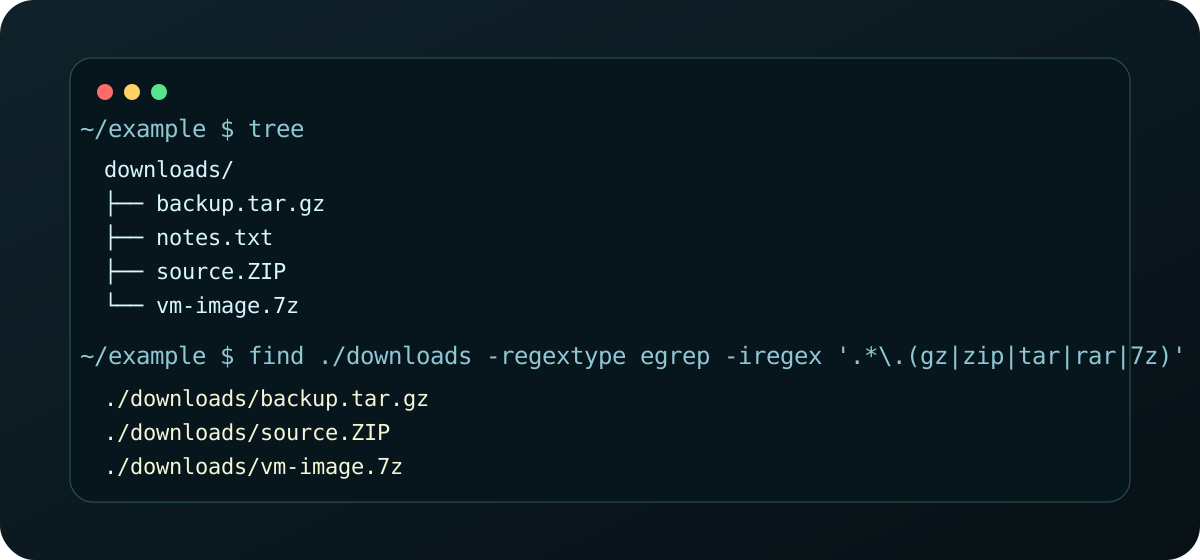
Given this directory:
downloads/
├── backup.tar.gz
├── notes.txt
├── source.ZIP
└── vm-image.7z
Run:
find ./downloads -regextype egrep -iregex '.*\.(gz|zip|tar|rar|7z)'
Expected output:
./downloads/backup.tar.gz
./downloads/source.ZIP
./downloads/vm-image.7z
source.ZIP matches because -iregex ignores case. If you want case-sensitive
matching, use -regex.
Why this can be better than repeated -name
The longer form is easy to write in a hurry:
find ./ -name "*.gz" -o -name "*.zip" -o -name "tar" -o -name "rar" -o -name "7z"
Both styles can work, but the repeated -name ... -o ... form has two traps:
- it gets long quickly;
-ohas operator-precedence behavior that surprises people when they add more tests later.
For example, this looks reasonable:
find ./ -type f -name "*.gz" -o -name "*.zip"
But the -type f test does not automatically apply to both sides the way many
people mentally read it. The safer grouped form is:
find ./ -type f \( -name "*.gz" -o -name "*.zip" \)
That is perfectly valid, but once the extension list grows, the regex version is often easier to review:
find ./ -type f -regextype egrep -iregex '.*\.(gz|zip|tar|rar|7z)'
The regex version is usually easier to:
- copy into a runbook;
- review in a pull request;
- expand with one more extension;
- teach to a newer engineer.
A note for scripts
If this command is going into automation, make the assumptions visible:
#!/usr/bin/env bash
set -euo pipefail

if ! find --version 2>/dev/null | grep -qi 'gnu findutils'; then
  echo "This script expects GNU findutils." >&2
  exit 2
fi

find ./downloads -type f -regextype egrep -iregex '.*\.(gz|zip|tar|rar|7z)'
That is not glamorous, but it prevents the next person from learning about regex portability during an outage or migration window.
A useful operator rule
If a command looks like it is repeating the same idea three or four times, pause and ask whether the tool has a pattern language.
Sometimes the simple version is still best. But when you are searching for a family of files, a compact expression often reduces mistakes and makes the intent easier to preserve.
Legacy source: Auzietek Linux find note.